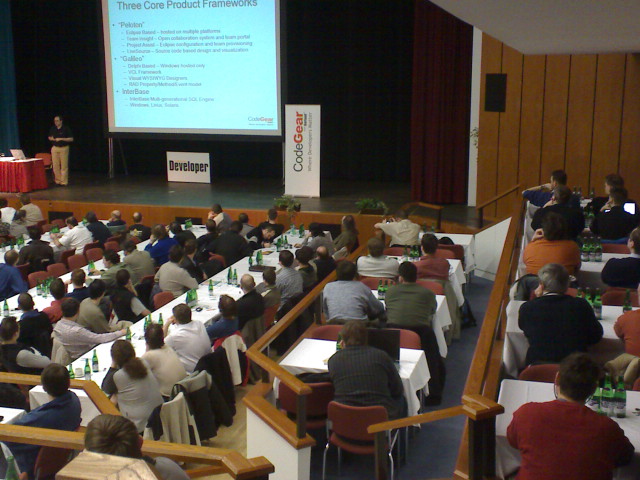
You can watch the recording of my session “Vista Enable Your Applications” during the CodeGear European Web Seminar Developer Days. I have also uploaded the slides on code central.
You are currently browsing articles tagged UAC.
Tags: CodeGear, Delphi, UAC, User Account Control, Vista, UAC
I talked about User Account Control in Windows Vista at the Developer Day in Gothenburg yesterday.
One of the topics was about signing you application so a user knows who published it. In earlier windows versions this is something that the user see when he download an application like an installer but in Windows Vista publisher is also showed in the consent dialog every time you start an application elevated (running as administrator).
And there is also one more difference – if you elevate an unsigned application User Account Control shows a big orange dialog with a lot of threatening text. If it is signed UAC will use a smaller, less threatening dialog similar to the one you see when you elevate applications signed by Microsoft.
Signing your application is also an requirement to get your application Vista Logo compliant.
So how do you get you application signed then? Well, the descriptions you find when you search is really scary.
“If the programmer uses a Borland product, for example Delphi, the developer has to find those 3 files on the Microsoft web site. Microsoft has removed the file codesigningx86.exe from their web site which contained the 3 files. Now the developer is required to download 19 different files, perform a cab extraction of nearly a GB of files, and install an SDK just to get those 3 files.”
But I found an exelent small tool that solves the whole process in a minute from x2net. It comes with a demo cert to make it easy to test. (If you want the demo cert to work with UAC dialog on Windows Vista you must manually install the demo root certificate into the local machines certificate store)
Tags: CodeGear, Delphi, UAC, User Account Control, Vista, UAC
I got some more questions yesterday after bloging about how to get you application using Paradox or dBase tables to function under Windows Vista yesterday.
The first one is how do you add BDE to you installation project? That is easy. Just download the BDE Merge Module and add the MSM-file to you Setup-project.
I read a forum post how this can be extended with InstallAware pre-requisites mechanism so the file-set is only downloaded and installed if needed.
Tags: BDE, CodeGear, Delphi, UAC, User Account Control, Vista, UAC
I get a constant stream of small questions about Delphi in my inbox. Some are easy to answer and usually just send a quick response others are more complicated. But why not share some of those answers with all of you?
1) How can I install an external ActiveX control (.OCX file) in Delphi?
- Click File > New > Package – Delphi for Win32
- Save the Package project.
- Click Component > Import Component…
- Select Import ActiveX control.
- Select ActiveX-control in list or click Add and browse the for file.
- Fill in component details, like name and palette page.
- Optionally set unit directory to same location as where you saved the package project.
- Optionally check Generate component wrappers.
- Select Add unit to Package and Finish.
- Right click on
the Package in Project manager to Build and Install package.´
Why should I change where the unit is saved? Personally I prefer to have the package and its source in a folder under version control rather than have it stored in Delphi’s local import folder. It makes it easier for the rest of the team.
Turbo Delphi 2006 Professional users
Import Component and View>Type Library is missing because of a defect. Here is a workaround:
- Create this directory: $(BDS)\include\atl\
- Create an empty file named: ATLBASE.H
Turbo Delphi Pro now has the Component/Import Component and View/Type Library menu choices.
2) How do I get my application with Paradox tables to work on Windows Vista?
This one is a little bit tricky. There are several pitfalls here.
First of all you need to install BDE with your applications installer as usual. If you are using a comercial installer or call you installation executable setup.exe, Vista will detect that it is an installer and suggest running it as administrator which is needed to write files in the Program Files folder and the local machine registry.
Secondly, do you add global BDE-aliases for you database? They are stored in idapi.cfg file under Program Files where a standard user does not have the rights needed to alter files. It will work if you do this from the installer since it is running as administrator but if you add aliases from your application there might be trouble ahead! Windows Vista has a nasty compatibility feature called Virtualization or Redirection that will silently create personal copies of files instead of giving you an access denied error. Consider the administrative nightmare when every user has their own copy of idapi.cfg hidden in a personal VirtualStore folder. You can easily turn all compatibility features off by checking Enable runtime themes in Project > Options > Application in Delphi 2007 (or by manually adding a manifest). Remember that should always run the BDE Admin tool and control panel applet as administrator since running them as Standard User also will create a copy of idapi.cfg in the personal VirtualStore.
My suggestion is that you use a TDatabase component in you application instead of using global aliases and create a private alias for you application by setting DatabaseName and use DriverName and Params property instead of Alias property.
Next problem is the location of the database. If you have put you Paradox or dBase files it in the Program Files folder you will trigger Virtualization and then you have parts of the database in each users VirtualStore! Try to mend that mess into one database again. You should follow the steps above to add a manifest to your executable and get access denied errors instead of this mess.
Use the SHGetFolderPath function to get a path to a better location where Standard Users have read and write access. You will find an example of this in the File > New Other…> Win2000 Logo Application. Consider using CSIDL_COMMON_APPDATA if it is a shared database. You can easily get you installer to put you database files here instead by using pre-defined constants (i.e. [CommonAppDataFolder] in InstallShield, $ALLAPPDATA$ in InstallAware).
For Paradox there is the problem with NetFileDir. The default value “C:\” will not work. To get around this, add a TSession component to your application and set NetFileDir using a value from the SHGetFolderPath function. Use CSIDL_COMMON_APPDATA.
Finally, consider upgrading your Paradox or dBase database to InterBase instead!
Tags: BDE, CodeGear, Delphi, UAC, User Account Control, Vista, UAC
The last weeks have been quite hectic, I have been face-to-face with over a thousand Delphi developers talking about Delphi 2007 for Win32 in Stockholm, Gothenburg (thanks Karl-Otto for the CodeGeare cap), Budapest, Prauge (see picture), Helsinki, Copenhagen and Oslo.
Jason Vokes tagged me and challenged me to write about five things I like with the new Delphi release:
- Like many other already have said, Delphi 2007 launches fast and has a quick and responsive IDE.
- Second out are some small debugger features that are really usefull – You can set breakpoints in the call stack and stop execution when it returns to a specific stack frame and you can also select some code and drag and drop it to the watches windows for evaluation.
- All RTL and VCL improvements like the MainFormOnTaskbar property on TApplication that solves the long existing problem with the application context menu, Flip3D and Thumbnail support. Improvement of DoubleBuffered rendering. Usage of themed components in IDE. Updated memory manager, etc.
- The much improved help system.
- And finally another small productivity feature – you can save several diffrent configurations of compiler and linker settings and easily switch between them with the Configuration Manager.
I talked about User Account Control (UAC) during my CodeRage-session last week. I think UAC is one of the most important features of Windows Vista and if you are not in total control of your users’ environment, sooner or later you will run into questions and support issus related to UAC.
UAC Horror Story
I heard a real horror story related to UAC from a developer in Sweden last week during the Delphi User Group meeting in Stockholm. Their application has a local database and the database engine is launched by the application. Since UAC made the application start as Standard User the database enginge also started as Standard User. But a Standard User did not have the rights needed to modify the database files where they got installed. You would assume that this would generate an Access Denied error or some other error message? But no, and now the horror begins…
Since their application did not have required execution level information in the manifest Windows Vista runs the process in compatibility mode. Instead of failing to open the database which the process has no right to modify Windows Vista silently makes a copy of the whole database (to the personal VirtualStore for each user) and saves the changes there instead. The users did not notice anything initally because they work on diffrent projects but after a while they started to wonder why they could not see any changes their colleagues have done.
When they found out what was wrong they had to do a lot of manual work to merge each users’ copy of the database back into one database again…
Conclusion: To get rid of the dangerous compatibility feature called Virtualization or Redirection by adding a manifest with required execution level to all you executables immediately! This can be done easily by just recompiling your application in Delphi 2007 for Win32 and checking use themes in project options or use the xpman unit in D2007. With an earlier Delphi release you can manually create and include the manifest.
Command Line Applications
I did not talk so much about command line applications and UAC during my Code-Rage session so I would like to write a little about that.
First, like with all applications targeting Windows Vista, you should have a manifest with required execution level to turn off compatibility mode. But even if you command line tool requires admin privileges you should never set level = “requireAdministrator”. The reason for this is that you do not want a batch script to be interrupted with a modal consent dialog, instead Microsoft recommends you to halt execution with an error message and set the exit code to ERROR_ELEVATION_REQUIRED.
program VistaConsoleApplication;
{$APPTYPE CONSOLE}
//Include Manifest with trustinfo to make executable Vista Logo Compliant and not run in compatibility mode.
//Console Applications should always run as invoker even if they require admin privileges.
{$R ‘ExecutionLevelAsInvokerManifest.res’ ‘ExecutionLevelAsInvokerManifest.rc’}uses
SysUtils,
UserAccessControlUtils in ‘UserAccessControlUtils.pas’;begin
//Call function to test we have admin privelieges
RequireAdminConsole;
//TODO: Your admin tool here…
end.
The RequireAdminConsole function is really simple and it uses a function IsUserAnAdmin in the WinAPI to test. I have written the code so it binds dynamically. The reason is to make it work on operation systems before Windows 2000. You could also use a NT4 compatible apporoach and check if token has SID for admin group but that would be much more code…
const
ModName = ‘shell32.dll’;
var
hShell32: HMODULE;
_IsUserAnAdmin: function(): BOOL; stdcall;function IsUserAnAdmin: Boolean;
begin
if Assigned(_IsUserAnAdmin) then
Result := _IsUserAnAdmin()
else
begin
Result := True;
if hShell32 = 0 then
hShell32 := LoadLibrary(ModName);
if hShell32 <> 0 then
begin
_IsUserAnAdmin := GetProcAddress(hShell32, ‘IsUserAnAdmin’); // Do not localize
if Assigned(_IsUserAnAdmin) then
Result := _IsUserAnAdmin();
end;
end;
end;resourcestring
SErrorElevationRequired = ‘Access Denied. Administrator permissions are needed to use the selected options. Use an administrator command prompt to complete these tasks.’;
const
ERROR_ELEVATION_REQUIRED = 740;procedure RequireAdminConsole;
begin
if not IsUserAnAdmin then
begin
WriteLn(SErrorElevationRequired);
Halt(ERROR_ELEVATION_REQUIRED);
end;
end;
A new question
The code above just checks if your process is currently running with admin privileges. But with UAC there is also another question – can the user become an administrator?
Since UAC splits the login token into a user token and a full token during login (if you have admin priveliges) you need to use new WinAPI features to find the answer to this question.
type
//Enumeration is mirroring TOKEN_ELEVATION_TYPE in Windows Vista SDK (except first value).
TTokenElevationType = (TokenElevationNotAvailable, TokenElevationTypeDefault, TokenElevationTypeFull, TokenElevationTypeLimited);//Extend existing enumeration in Windows.pas with new Vista constants
TTokenInformationClass = (TokenUser = 1, TokenGroups, TokenPrivileges,
TokenOwner, TokenPrimaryGroup, TokenDefaultDacl, TokenSource, TokenType,
TokenImpersonationLevel, TokenStatistics, TokenRestrictedSids, TokenSessionId,
TokenGroupsAndPrivileges, TokenSessionReference, TokenSandBoxInert, TokenAuditPolicy,
TokenOrigin, TokenElevationType, TokenLinkedToken, TokenElevation, TokenHasRestrictions,
TokenAccessInformation, TokenVirtualizationAllowed, TokenVirtualizationEnabled,
TokenIntegrityLevel, TokenUIAccess, TokenMandatoryPolicy, TokenLogonSid);function GetTokenElevationType: TTokenElevationType;
var
hToken: THandle;
elevationType: Integer;
dwSize: DWORD;
begin
Result := TokenElevationNotAvailable;
hToken := 0;
Win32Check(OpenProcessToken(GetCurrentProcess(), TOKEN_QUERY, hToken));
if GetTokenInformation(hToken, Windows.TTokenInformationClass(TokenElevationType), @elevationType, sizeof(elevationType), dwSize) then
Result := TTokenElevationType(elevationType);
if hToken<>0 then
CloseHandle(hToken);
end;
Call the function GetTokenElevationType above to test the current state of elevation.
case GetTokenElevationType of
TokenElevationNotAvailable:
WriteLn(‘No information about elevation is available. (This is a non-vista machine)’);
TokenElevationTypeDefault:
WriteLn(‘TokenElevationTypeDefault – User is not using a split token.’);
TokenElevationTypeFull:
WriteLn(‘TokenElevationTypeFull – User has a split token, and the process is running elevated.’);
TokenElevationTypeLimited:
WriteLn(‘TokenElevationTypeLimited – User has a split token, but the process is not running elevated.’);
end;
You can download the example application here. Please, share if you find any problems with the code above or if you have your UAC horror stories of you own!
Tags: CodeGear, Delphi, UAC, User Account Control, Vista, UAC

![Fredrik Haglund [Photo by: Kristina Sahlén]](http://blog.fredrikhaglund.se/wp-content/uploads/2010/03/fredrik200.jpg)

Recent Comments