Import

You are currently browsing articles tagged Import.

I have been working a lot with migration and mirroring lately using EPiServer’s functions for export and import of data.

My EPiServer Wish list

  • Show call stack when exceptions halt export or import jobs
  • Show PageID and Property related to errors and warnings during import and export

This area of the product is still one of EPiServer weaker areas mainly because the error massages when something goes wrong does not contain enough information.

I want to share the last issue I run into today and also show how I did to find out what was wrong. We could not export and only got this lovely message:

The following errors have occurred: Exception: Object reference not set to an instance of an object.[]

As you can see not much to go on here…

Strategy to resolve issues with EPiServer Export

image First thing you should do is to narrow down what is causing our problems and a call stack can often help. 1) We need to attach your debugger to the web server.

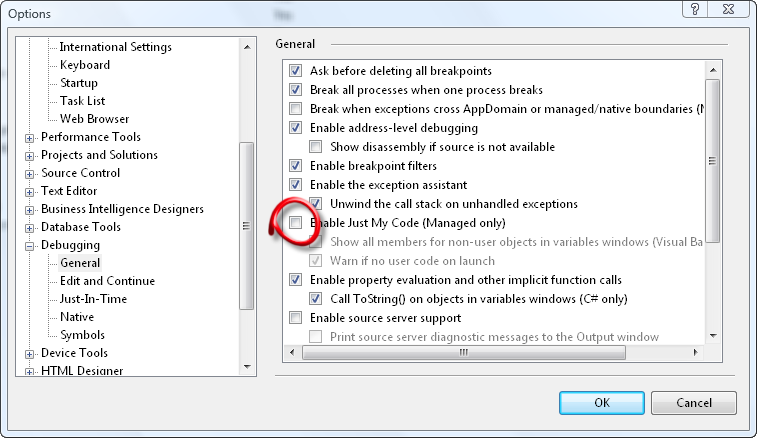
2) We must make sure it halts on thrown exceptions even if it outside our code. Open your options dialog and uncheck”Enable Just My Code”.

imageWith default settings the debugger will only break on uncaught exceptions.

3) We need the debugger to break when an exceptions are thrown regardless of they are handled by a try-catch statement.

This can be changed in your Exceptions dialog (Ctrl+Shift+E). You can either set it to catch all managed exceptions as I have in the screen shot or if you know what exception you are looking for you can halt on that one alone.

We are now ready to start the export again to trigger the error. If everything is correctly configured it will break on the exception and show you a call stack.

Analyzing the call stack and Disassembling EPiServer

imageWith a call stack we have more clues to go on. In this case the two methods on top of the call stack gives us valuable clues.

Use Lutz Roeder’s .NET Reflector and click File>Open to load all assemblies in your web applications bin-folder. Search for the class or method and Disassemble the two methods and get more clues.

PropertyCategoryTransform.TransformCategoryForExport
PageTypeTransfer.Export

In this case it is probable that calling split on categoriesAsIds when categoriesAsIds is null is the culprit.

image Looking at the calling method we can see that it is calling TransformCategoryForExport for PageDefinitions (a PageDefinition is another name for a property on a page type) if it as a Category. It does so to convert the Default Value for a Category property into a string with names instead of integer ids.

Conclusion and workaround

It is not possible to export a page type if you add a property of type Category selection (in EPiServer CMS 5 RC1 SP1 5.1.422.122). The reason is that default value is null and an easy workaround is to set the default value to “1″ for each added Category property. The value “1″ is the root category.

Tags: , , , , , , , , , ,

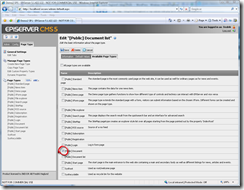
image_thumb[10]It is a best practice to limit the number of Pages Types an editor can choose from when the editor creates a new page.

As you probably know this is configured in Admin Mode on each Page Type. What you probably don’t think about is that these settings can make it impossible to import and export pages.

“Available Page Types”-rules can break import

If your rules change over time or if you use Stop Publish and Archive Page so your pages moves around you can get in trouble with these rules.

In the current version (5.1.422.122 SP1) the import will stop with an error and it can be quite hard to figure out what is wrong.

I created a SQL-statement to help you figure out what is wrong. It will give you a list of all pages breaking the “Available Page Types”-rules. It lists the Parent and Child’s Page Id, Page Name and also Page Type.

image

This (messy) SQL statement for copy paste:

SELECT fkParentID AS ParentPageId, pkID AS ChildPageId, (SELECT Name FROM tblPage AS p2 WHERE (pkID = p.fkParentID)) AS ParentPageName, Name AS ChildPageName, (SELECT fkPageTypeID FROM tblPage AS p2 WHERE (pkID = p.fkParentID)) AS ParentPageTypeId, fkPageTypeID AS ChildPageTypeId FROM tblPage AS p WHERE (NOT EXISTS (SELECT fkPageTypeParentID, fkPageTypeChildID, Access FROM tblPageTypeToPageType AS tt WHERE (fkPageTypeParentID = (SELECT fkPageTypeID FROM tblPage AS p2 WHERE (pkID = p.fkParentID))) AND (fkPageTypeChildID = p.fkPageTypeID))) AND EXISTS (SELECT fkPageTypeParentID, fkPageTypeChildID, Access FROM tblPageTypeToPageType AS tt WHERE (fkPageTypeParentID = (SELECT fkPageTypeID FROM tblPage AS p2 WHERE (pkID = p.fkParentID))))

Tags: , , , , ,

If you export pages that have the Build-in property Archive Page set pointing to a page that is not included in your export package you will get an exception. At least if you are migrating from EPiServer 4 to 5.1.

Use the following script if you want to clear all the value of Archive page on all pages in your source database:

UPDATE tblPageTypeDefault
SET fkArchivePageID = NULL

Remember to do a iisreset to invalidate all cached information after you change in the database.

Tags: , , , , ,

As you probably know EPiServer CMS 5 does not encrypt the export packages like version 4 did. You can open them easily and look inside by changing the extension to zip.

The export packages from EPiServer 4 is encrypted and sometimes when you try to import them in EPiServer 5 you get the most strange and non helping exception (like NullReferenceException). I had this problem and the only solution I could find was to crack the encryption of the export package so I could look inside and find the error.

Download the EPiServer 4 Export Package Decryption Tool

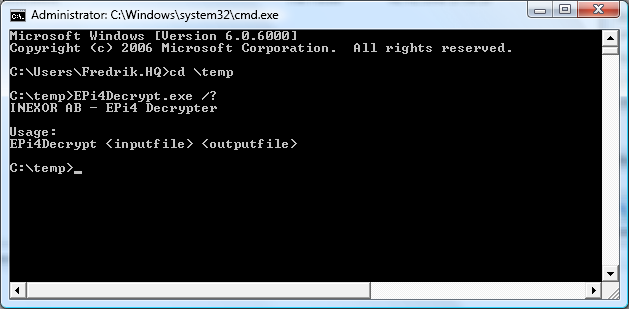
imageIf you have the same problem you can use the Decryption tool for EPiServer 4 Export Packages that I created.

The tool takes to parameters. The first should be the encrypted export package file. The second should be a non-existing filename ending with “.zip”.

Tags: , , , , ,