GetChildren

You are currently browsing articles tagged GetChildren.

I recently got the question how to fix the incorrect alphabetic sorting of child pages in EPiServer. It is usually Scandinavian users complaining that Å, Ä and Ö are sorted together with A and O instead of being at the end of the list.

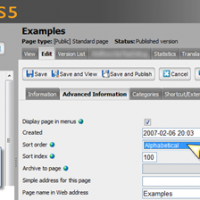
Sort order: Alphabetical

When you specify the sort order of child pages your selection is stored in the database (tblPage.PeerOrderRule) and is shared for all language branches.
When you use GetChildren() it calls a stored procedure called netPageLinkList that returns the children ordered differently depending on the selection. Sorting is done in the database.

Easy Solution To Child Page Sort Order in EPiServer

1) Easiest way to fix sorting is to change the Collation order of the Name column in the tblPageLanguage table.

image

different sort order depending on the current culture

The easy solution only allows one common sort order for the entire database and that might not be good enough for multi lingual sites.
2) You can solve this for the whole site by hooking the event DataFactory.FinishedLoadingChildren and resorting the pages. Remember that this event is called every time you call GetChildren() and the result is not cached.
3) Another way is to solve it locally is to use the FilterSort class on you PageDataCollection or setting the SortOrder property on you PageList.

Tags: , , , , , , , ,

Mari Jørgensen wrote about Breaking change in GetChildren() and I would like to share some of my findings when working with PageData from code when you want to use the built-in flow for publishing.

As you might know a Page Version can have VersionStatus Not Ready (CheckedOut), Ready To Publish (CheckedOut), Published and Previously Published. Since you in almost all cases are only interested in the published version most methods in DataFactory class only returns PageData objects with the published version.

Get unpublished pages and pages not in current language branch

GetPage() and GetChildren() returns page(s) published in the current language. You always have to use in a ILanguageSelector if you want to get PageData for another Language Branch than the current language branch.

PageDataCollection pages =
  DataFactory.Instance.GetChildren(
    CurrentPage.PageLink,  LanguageSelector.AutoDetect(true));

This will retrieve all children the same way as the Page Tree in the Structure Tab in Edit Mode. If there is no published version in the Current Content Language it will return PageData for the Master Langauge Branch, regardless of Publish Status.

Saving a page without publishing it

It is easy to create a new page and not publish it. This can be used for moderation where an Editor uses the publish button in Edit mode to approve.

PageData page = DataFactory.Instance.GetDefaultPageData(
                  rootpage.PageLink, "My Page Type");
page.PageName = "New Page";
DataFactory.Instance.Save(page, SaveAction.CheckIn,
                          AccessLevel.NoAccess);

SaveAction.CheckIn will make you page Ready to Publish.

Access Rights

Even if the current your is not an Editor you may give them Edit access rights to their pages.  It is very easy to add access rights for the current user after the page is saved. Note that all existing access right on the parent page will be inherited as usual.

PageAccessControlList acl = new PageAccessControlList(page.PageLink);
acl.Add(new AccessControlEntry(
          Membership.GetUser().UserName,
          AccessLevel.Read | AccessLevel.Edit | AccessLevel.Create | AccessLevel.Delete,
          SecurityEntityType.User));
acl.Save();

It is also easy to filter a collection and remove pages you should not be able to change.

new FilterAccess(AccessLevel.Edit).Filter(pages);

Another approach is to show the page but maybe disable the edit button.

bool canChange = page.QueryDistinctAccess(AccessLevel.Edit);

Page Versions and Unpublished Pages

Property Values for the Published Version of a Page is stored in different tables in the database than all other versions of the page. You need something called WorkID in your PageReference to load other versions of a page than the published version.

WARNING! Last time I checked GetPage() and GetPages() returned skeleton PageData objects, where all user defined properties are null, for unpublished pages if you did not have a WorkID.

This is an example of how you have to use PageVersion class to retrieve a list of all versions of a page. Each PageVersion has a PageReference with both PageID and WorkID

public static PageData GetLastVersion(PageReference pageRef)
{
    PageVersionCollection pageVersions = PageVersion.List(pageRef);
    PageReference lastVersion = pageVersions[0].ID;
    foreach (PageVersion pageVersion in pageVersions)
    {
        if (pageVersion.IsMasterLanguageBranch)
        {
            lastVersion = pageVersion.ID;
        }
    }
    return DataFactory.Instance.GetPage(lastVersion,
             LanguageSelector.AutoDetect(true));
}

When you have a PageReference with WorkID you can use it with GetPage() to retrieve other versions of a Page. Using and a LanguageSelector with fallback to Master Language is required to get around the filter.

Update a page without creating a new version

Sometimes you want to change a PageData object without creating a new version. In the example below UpdatePageFromForm copies values from text boxes to the page. If a value has changed it will be saved.

page = GetLastVersion(pageRef).CreateWritableClone();
UpdatePageFromForm(page);
if (page.IsModified)
{
    SaveAction saveAction = SaveAction.CheckIn;
    if (page.Status != VersionStatus.Published)
    {
        // Update existing version if it is not published
        saveAction = saveAction | SaveAction.ForceCurrentVersion;
    }
    DataFactory.Instance.Save(page, saveAction);
}

That’s all for now folks!

Please, leave a comment if you learned something. It is good for my blogging morale to know that someone got helped…

Tags: , , , , , , , , , ,