EPiServer.SchedulerSvc.exe.config

You are currently browsing articles tagged EPiServer.SchedulerSvc.exe.config.

If you have problems with the EPiServer Scheduler Service unexcitingly stopping you can also turn on debug logging to get more clues.

Change EPiServer.SchedulerSvc.exe.config FILE

You need to add the following to the service’s config-file to get detailed call stacks for exceptions that occur in you web application:

<system.runtime.remoting>
  <customErrors mode="Off"/>
</system.runtime.remoting>

Update EPiServer.SchedulerSvc Registry

image Prepare a folder for the log file and make sure the account running the service has write access. I’m usually lazy and give everyone full access since this logging usually is not left on forever.

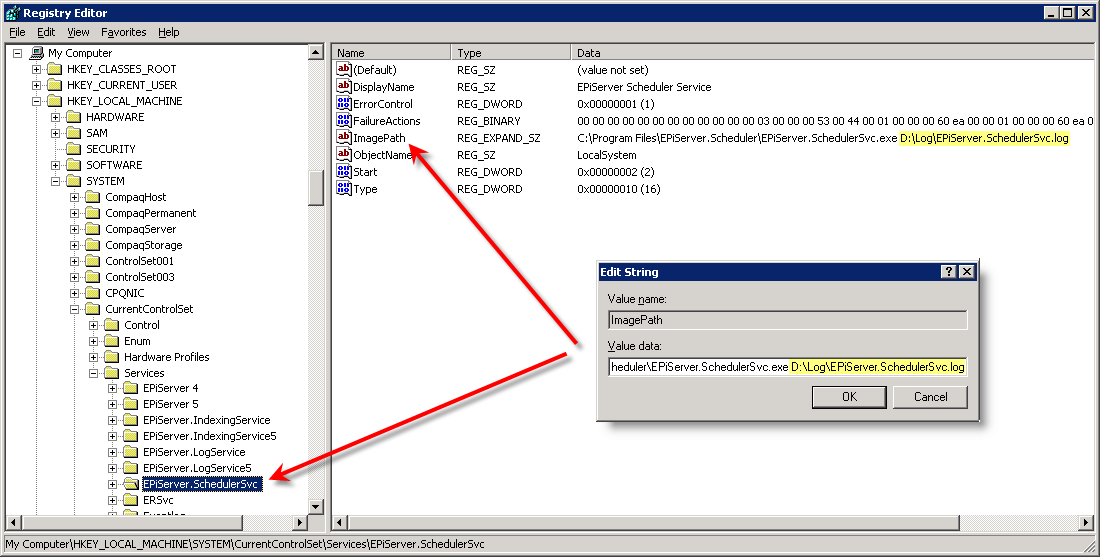
User RegEdit and change the ImagePath value for the EPiServer Scheduler Service to include a parameter with the log-filename.

HKLM\SYSTEM\CurrentControlSet\Services\EPiServer.SchedulerSvc
ImagePath = C:\Program Files\EPiServer.Scheduler\EPiServer.SchedulerSvc.exe D:\Log\EPiServer.SchedulerSvc.log

Be careful when you edit the Registry! I use to export the key to a file before I change anything so I can look at the original configuration.

See also: Auto Restart of EPiServer Scheduler Service

Tags: , , , , , , ,

Have you been annoyed by the exception “License violation! License is already in use at another online site” when you switch from one web site to another on you developer machine?

I have and the reason is of course that I use my developer license file in more than one place.

To workaround this problem you can always restart EPiServer Scheduler Service and recycle your application with an iisreset.

EPiServer appears to use the Scheduler Service for more things than just executing scheduled tasks. It is used when a central communication point is required like when you need to synchronize licenses between web applications…

Tags: , , ,