EPIServer 6

You are currently browsing articles tagged EPIServer 6.

This is a short demo of how you can use the new simpler way to implement Dynamic Content with a ordinary User Control and some Plug-In attributes.

Screenshot of Dynamic Content in EPiServer CMS using DynamicContentPlugIn attribute

DynamicContentPlugIn is the simplifying solution

First add a normal User Control or EPiServer User Control if you want to be aware about the Current Page.

HelloDynamic.ascx.cs


using EPiServer.DynamicContent;
using EPiServer.PlugIn;

namespace EPiServer
{
    [DynamicContentPlugIn(DisplayName = "Hello...", 

      ViewUrl = "~/HelloDynamic.ascx")]
    public partial class HelloDynamic : EPiServer.UserControlBase
    {
        public string Firstname { get; set; }
        public PageReference FeatureArticle { get; set; }
    }
}

DynamicContentPlugIn will auto register the Dynamic Content control and wrap wrap all handling of settings, rendering and state handling. There is no need to register the class in episerver.config or to implement IDynamicContent.

All public properties inheriting from PageData will be used as settings. Properties with primitives as type like string, int, bool but also PageReference will be converted to PropertyString, PropertyNumber, PropertyBoolean respectively PropertyPageReference.

HelloDynamic.ascx

<%@ Control Language="C#" AutoEventWireup="true" CodeBehind="HelloDynamic.ascx.cs" Inherits="EPiServer.HelloDynamic" %>
<h1>Hello <%= Firstname %>!</h1>

How to add a Custom Settings Editor for Dynamic Content

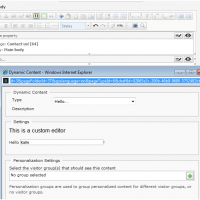
imageIf you do not use the Url and Area parameters of the DynamicContentPlugIn attribute you will get the default settings editor that just show all Properties in a list.

HelloDynamic.ascx.cs


    [DynamicContentPlugIn(DisplayName = "Hello...", 

        ViewUrl = "~/HelloDynamic.ascx", 

        Url = "~/HelloDynamicEdit.ascx", 

        Area = PlugInArea.DynamicContent)]
    public partial class HelloDynamic : EPiServer.UserControlBase

HelloDynamicEdit.ascx.cs

using EPiServer.DynamicContent;

namespace EPiServer
{
    public partial class HelloDynamicEdit : DynamicContentEditControl
    {
        protected void Page_Load(object sender, EventArgs e)
        {
            if (!IsPostBack)
            {
                Firstname.Text = Content.Properties["Firstname"].Value as string;
            }
        }

        public override void PrepareForSave()
        {
            Content.Properties["Firstname"].Value = Firstname.Text;
        }
    }
}

Inherit from DynamicContentEditControl and implement the method PrepareForSave() to move the values back from your user interface to the Property collection of your Dynamic Content class. Note the use of IsPostBack to prevent overwriting of changed values.

HelloDynamicEdit.ascx

<%@ Control Language="C#" AutoEventWireup="true" CodeBehind="HelloDynamicEdit.ascx.cs" Inherits="EPiServer.HelloDynamicEdit" %>
<h1>This is a custom editor</h1>
<p>Hello <asp:TextBox ID="Firstname" runat="server" />!</p>

Translating the User Interface for Dynamic Content

You can use the DisplayName and Description parameters for the name and instructions for editors. Use LanguagePath parameter together with translations in the lang-folder.


    [DynamicContentPlugIn(DisplayName = "Hello...", 

        ViewUrl = "~/HelloDynamic.ascx", 

        LanguagePath = "/dynamiccontent/hello")]
    public partial class HelloDynamic : EPiServer.UserControlBase
<?xml version="1.0" encoding="utf-8" standalone="yes"?>
<languages>
   <language name="Svenska" id="sv">
      <dynamiccontent>
         <hello>
            <name>Hej…</name>
            <description>En beskrivning…</description>
         </hello>
      </dynamiccontent>
      <pagetypes>
         <common>
            <property name="Firstname">
               <caption>Fornamn</caption>
               <help>Vad heter du?</help>
            </property>
         </common>
      </pagetypes>
   </language>
</languages>

Tags: , ,

This blog post is based on the experience of upgrading one EPiServer CMS 5 project and creating a new one from scratch based on a release candidate of EPiServer CMS 6 and things may change before the release.

New configuration files

Web.config contained a lot of settings for EPiServer CMS that is now split into several files. Unfortunately another 250 lines of configuration is also added increasing the burden to manage the configuration.

EPiServerFramework.config

This file contains mapping between host header name and site and default language. This information was previously located in configuration/episerver/sites/site/siteHosts-tag.

Notice that the EpiServer framework automatically updates this file with machine specific information which makes it harder to put under version control but EPiServer will work even if the file is read-only (you get some exceptions in the log files and maybe temporary version of the files).

It is needed by all developers, staging and QA so one strategy could be to put it on version control directly or check-in a file with another name or location copy it during the post build event.

episerver.config

This is basically everything previously located in configuration/episerver-tag in web.config. It is connected using the configSource attribute in the same way as connectionStrings.config-file.

It contains the same information as before except that siteHosts-tag is migrated to EPiServerFramework.config-file.

In addition to the paths in configuration/episerver/virtualPath/providers/add-tag another machine specific attribute has been added on the site-tag called licenseFilePath.

This file must be put under version control but if the machine specific licenseFilePath it is present it will be hard to get it to work well.

New configuration

There are new sections in web.config and for episerver.shell and episerver.datastore.

episerver.shell

You need to add you modules here if you want to add your own things to the new menu system or add gadgets to the new Dashboard.

episerver.datastore

Even if you do not use the datastore yourself EPiServer does for XForms and other features that was previously handled by the now deprecated objectstore. You need to make sure that you change the connectionStringName-attribute to match the one your site is using.

Since it is possible to have different values on connectionStringName-attribute on configuration/episerver/sites/site/siteSettings-tag in an Enterprise setup this can be problematic.

Change of configuration does not restart application

Both episerver and episerver.framework configuration section has restartOnExternalChanges attrubute set to false.

This is annoying because you have to remember to manually do a iisreset or change web.config to trigger a restart so your changes take effect.

New Site/License Information feature in Admin Mode

There is a new feature that enables you to upload, activate or request a demo license in admin mode. This feature should not be used by developers since it adds machine specific information episerver.config. If you do and check in the changes your co-developers will get a file that does not work on their computer.

My suggestion is to continue using the manual approach and add the Licence.config-file to the application root folder your self. Remeber that if you want to put your license files under version control it is possible to do that very easily because EPiServer will look for “License.config” first and then “MACHINENAMELicense.config” so just rename your license.config-file and check it in.

Location of EPiServer User Interface is changed during upgrade

Notice that all location and VPP paths for EPiServers User Interface are changed during upgrade. If you path to edit mode was /secret/edit before it will now be /secret/CMS/edit. There is no redirect so bookmarks or hard coded links in your application to edit mode may break.

Language files

Notice that you no longer can translate the whole EPiServer User Interface yourself (or override some translations) by changing xml-files in the lang folder. The new Dashboard feature (aka. Shell, Online Center) is using binary resource assemblies.

Tags: , , , , , , ,