EPiServer 5

You are currently browsing articles tagged EPiServer 5.

There are many factors to look at when you want to tune the performance of your EPiServer site. This is the first post about common pitfalls and how to optimize EPiServer for performance.

EPiServer and Memory

First thing to check is that you have enough memory. EPiServer needs a lot of memory to cache the PageData object for each of all active pages on the site. The larger site (more pages) you have, the more memory you will need.

The DataFactory class will first look if the requested page or list of pages is in the cache when you call GetPage() or GetChildren(). If it is not in the cache, the page or list will be loaded from the database and added to the cache. The default implementation (read more about pluggable runtime cache) uses ASP.NET’s built-in public cache to store pages and lists in memory.

EPiServer Database Cache UsageThe public cache in ASP.NET is also used to store other data in addition to EPiServer PageData and Lists. Periodically ASP.NET will use a Least Recently Used (LRU) algorithm to scavenge the cache for more space. If the memory pressure is very high the lifetime of cached items can be very short or even zero (not added at all). This is not good for EPiServer’s performance.

It is easy to see what’s inside your cache:

protected void Page_Load(object sender, EventArgs e)
{
    foreach (DictionaryEntry d in this.Cache)
    {
        Response.Write(d.Key);
        Response.Write(" - ");
        Response.Write(d.Value);
        Response.Write("<hr>");
    }
}

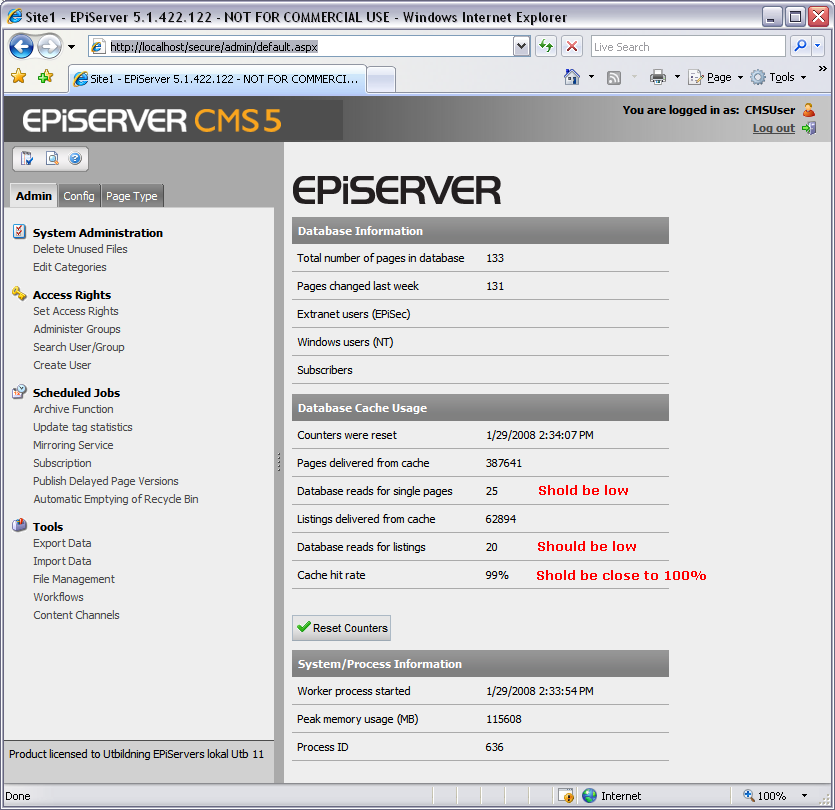
A very good indicator if Memory is an issue is to look at some statistics from the DataFactory class. You can see the Cache hit rate if you go to admin mode. It should be close to 100% or maybe a few percent below. (It is normal that it drops to zero when you restart the site but it should climb fast.) A constant low value is one indicator that you need more memory because PageData objects are thrown out of the cache and then they must be reloaded from the database.Add EPiServer Performance CountersYou can also see the Cache Hit Ratio (and some other counters) through Windows Performance Monitor. This is a good value to monitor in a hosting environment and add an alert when the value becomes to low.

ASP.NET Worker Process / Application Pool

The maximum memory ASP.NET allows a worker process to consume before it is recycled is by default 60% of the total system memory. Read more about memoryLimit tag.

<system.web>
<processModel>
<memoryLimit>60</memoryLimit>
</processModel>
</system.web>

Default Application Pool – Do not use it and do NOT delete it (even if you plan to never use it). Create your own pool instead but not create one pool for each site on the web server. Instead consolidate your applications into one pool and only use a separate pool for troublesome web applications. You must have separate pools for ASP.NET 1.1 and 2.0 applications though.

Application Pool RecyclingYou can also configure the application pool to recycle if it consumes to much memory. If you worker process constantly recycles you need to find out why because EPiServer will always be a little bit sluggish after a restart (before data is cached again). You also loose all in-process session data when the process restarts which is an issue of its own.

Settings: I recommend that you uncheck “Recycle worker process (in minutes)” and use “Recycle worker process at the following times” instead.

Application Pool Performance You should also uncheck “Shutdown worker process after being idle”. This is very important for EPiServer sites that has a low traffic (for example during the night).

Do not use Web Garden unless you know what you are doing. It will require double memory for the cache and out of process state-handling. If you change the number of worker processes from 1 to 2 it is like having two web servers on the same box with IIS acting like load balancer. (It is a cheap way in a development environment to test how you application will behave in a farm with load balancing.)

MSSQL Server and EPiServer

MSSQL Server Properties MemoryIts a best practice to have two machines, one for the web server and one for the database. But sometimes you have to run the database on the same machine as the web server. If you do, it is important to remeber that the MSSQL Server competes with the Web Server for resources like memory. You should always limit the amount of memory the database can use because it is better for EPiServer to have data cached in the web application than in the database.

Usually the usage of the database is low (around 5% CPU) in EPiServer scenarios because EPiServer tries to cache what it needs in the web application. If you have a higher usage of the database this can be an indication of that caching does not work as it should in the web application but it could also indicate that you do something else wrong. (More about database issues in a later post.)

Other processes

Finally, do not forget to have use the ordinary task manager to check if you have other processes that compete for the memory on your web server.

Tags: , , , , , , , , ,

I got a question about the File Manager from one of the attendees on my last EPiServer Developer training and I will share my answer with you.

You control the name, order and number of starting points in the File Manager for EPiServer CMS 5 by adding or removing Virtual Path Provides in web.config.

<virtualPath customFileSummary="~/FileSummary.config"> 

  <providers>  

    <add showInFileManager="false" virtualName="Page Files" virtualPath="~/PageFiles/" ... />  

    <add showInFileManager="true" virtualName="Global Files" virtualPath="~/Global/" ... />  

    <add showInFileManager="true" virtualName="Documents" virtualPath="~/Documents/"... />  

The virtualName is what you see in the File Manager.

EPiServer File Manager

You can hide providers from the File Manager by changeing the showInFileManager attribute to false but these providers will still be available from code. This can be usefull for generated thumbnail and similar.

If you open the File Manager without a page selected the first visible provider in the list will get focus.

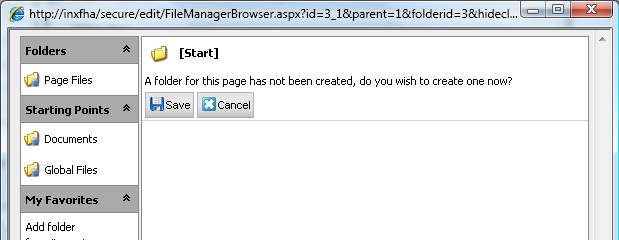
There is usually a current page when you open the file manager in edit mode (either in the action window or as a modal dialog) and you will always see the page folder or get a question if you want to create a new page folder if it does not exist. There is currently no way to disable page folders in the current (5.1.422) release as far as I know.

Which Virtual Path Provider that is used to store Page Folders is also controlled in web.config.

<episerver ...> 

  <sites>  

    <site ...>  

      <siteSettings ... pageFolderVirtualPathProvider="SitePageFiles" ... />  

A common mistake is to mix up the Page ID and the Page’s Folder ID. They are two separate number sequences and there is a property on the PageData obeject that stores the folder id for each page.

CurrentPage.Property["PageFolderID"].Value  

Follow this link to see more examples on how to use EpiServers Unified File System.

Tags: , , , , , , , , ,

In addition to the build-in properties on EPiServer pages there are some additional user defined properties that have a special function from EPiServers point of view. As a beginner to EPiServer it is easy to miss this so after teaching new developers this week I thought I should hunt the down and make a list.

The property can either be defined directly on a page type or as a dynamic property so the value it can be inherited in a branch of the page tree. It is possible to both define properties as a dynamic and on page types. In this case the value on the page is used first.

Context Property name Description
XHtml Editor,
XForms Editor
UIEditorCssPaths Comma separated list of css-files that is used in the xhtml editor. Each path should start with ~ to be relative to the application root. If there is no value set on the page or in a dynamic property it falls back to a setting on the siteSettings tag in web.config.The editor and some of it’s supporting dialogs is using the css-files to populates the class drop down list. EPiServer has a parser in javascript that looks for a special attribute ‘EditMenuName’ that is used as the human readable name for a style.
PageTemplateContainer PreviewText MainIntro, MainBody The PreviewText function is used to get a short description of the text. It takes the value from MainIntro and falls back to MainBody if it is blank. All html tags in MainBody is removed and only the first 400 characters is used.(PreviewText is using a regular expression to trim html tags and this can take some time if all pages in a long listing is missing MainIntro. Worth considering if you have performance issues with a listing.)
SubscriptionMail MainIntro, MainBody Properties expected on each page that should be subscribeable. MainInto and MainBody is used when generating the e-mail.
SubscriptionMail EPSUBSCRIBE-EXCLUDE, EPSUBSCRIBEHIDDEN, EPSUBSCRIBE EPSUBSCRIBE, EPSUBSCRIBEHIDDEN and EPSUBSCRIBE-EXCLUDE is used in diffrent parts of the Subscription mail mechanism and I have to write another blog post about the exact function of them.
SubscriptionDataSource EPSUBSCRIBE-ROOT Defines the startpage for SubscriptionDataSoruce.
SubscriptionMail MailReadMore, MailSubject, MailFrom Properties expected to be present on the subscription page that controls the sent message.
Calendar ValidDays, EventStartDate,
EventStopDate
The Calendar WebControl can create a list of all events between two dates. Event pages must have EventStartDate and EventStopDate to be included. ValidDays are optional but can be used to filter on which days a recurring event should be listed.
XForms DefaultFormFolder This is usually a dynamic property used to make life simpler for editors. You can organise your XForms into folders and if this property exists it will open the XForms editor with the folder matching the value as select.
SearchDataSource PageRank, IconPath, MainIntro This is read-only properties on the pages returned by a SearchDataSource.If you enable search in files temporary PageData objets are created for files that includes PageName for filename, PageChanged for when the file was uploaded and PageLinkUrl for the link to the file.
SiteMapProvider PageSiteMapProvider Used to get a SiteMapProvider from a Page. The name should match a SiteMapProvider defined in web.config.
OfficeIntegration IsDocumentPageType Controls if the client application should upload a copy of the original document. This will also be sent to the convert scripts that will skip building a rich HTML version if this property has not been set.
OfficeIntegration DocumentInternalPath If the IsDocumentPageType is set, this property will contain the path to the uploaded source document.
OfficeIntegration DocumentInternalHtmlPath If the IsDocumentPageType is set, this property will contain the path to the starting point for the rich HTML version.
OfficeIntegration DocumentExternalPath The path to the location of the source document may be used, for example, by other editors to see which document was used to publish this page.
OfficeIntegration AllowDocumentUpdate Controls if the client application should add properties to the word document so that the user can republish the document.

This list does not include properties used by the public templates. I’m pretty sure I missed some properties so please, write a comment if you know of anyone I missed!

Tags: , ,

I noticed that there is a problem with using ASP.NET membership providers in EPiServer CMS (5.1.422). When going to edit mode you get the following exception:

[EPiServerException: Can't find provider capability information for provider [XYZ].]
EPiServer.Security.ProviderCapabilities.IsSupported(String providerName, Action action) +117
EPiServer.UI.Edit.UserMembership.EnableFields() +418
EPiServer.UI.Edit.UserMembership.OnLoad(EventArgs e) +1201

The reason is because EPiServer only has hardcoded the capabilites for some of the default providers name like this:

static ProviderCapabilities()
{
_providerDictionary = new Dictionary();
_providerDictionary.Add("SqlServerMembershipProvider", new ProviderCapabilitySettings(true, true, true, new object[] { "email", true, "comment", true }));
_providerDictionary.Add("WindowsMembershipProvider", new ProviderCapabilitySettings(false, false, false, new object[] { "email", true, "comment", false }));
_providerDictionary.Add("SqlServerRoleProvider", new ProviderCapabilitySettings(true, true, true));
_providerDictionary.Add("WindowsRoleProvider", new ProviderCapabilitySettings(false, false, false));
}

To get it to work if you have providers with other names you must obviously register them manually (at least until EPiServer provides a better sollution) in Global.asax.cs. This is how I did it:

private void RegisterCapabilitiesOnMembershipProviders()
{
string defaultMembershipProviderName = ProviderFacade.GetDefaultMembershipProviderName();
string defaultRoleProviderName = ProviderFacade.GetDefaultRoleProviderName();
ProviderCapabilities.AddProvider(defaultMembershipProviderName, new ProviderCapabilitySettings(false, false, false, new object[] { "email", true, "comment", false }));
ProviderCapabilities.AddProvider(defaultRoleProviderName, new ProviderCapabilitySettings(false, false, false));
}
protected void Application_Start(Object sender, EventArgs e)
{
RegisterCapabilitiesOnMembershipProviders();
}

Update: This has changed in SP1 so it uses the class type and not the name. So a rename of a provider does not require registration but you must register capabilities if you write your own.

Tags: , , ,

Newer entries »