EPiServer 5

You are currently browsing articles tagged EPiServer 5.

The Event Management System in EPiServer CMS 5 is used to propagate information that a page has changed to other web servers connected to the same database.

This is very important to setup if you have more than one web server or an enterprise site with several start pages because if it does not invalidate cache, the other web sites can potentially return old versions of a page!

Pitfall – Default configuration is using Multicast UDP!

If you read Configuring EPiServer CMS 5 R2 SP2 Enterprise you will learn that all you have to do is to set enableRemoteEvents="true" in web.config.

It is only mentioned briefly that it is using UDP and you may have to change your firewall settings. Too be more specific the default configuration is using multicast UDP broadcast! Tell this to your network guys and watch their reaction…

If you look around you will also find a tech note about the Event Management System Specification and a FAQ about setting up a server to use TCP protocol but not all clues needed are found there – you have to dig with the reflector to find out the rest.

Scenario: 4 start pages, 8 Front-end servers IN DMZ and 2 in LAN

You can change how the Event Management System communicates by changing WCF settings in web.config. It is possible to use TCP instead of UDP and also specify ports to use.

First, the current release (5 R2 SP2) does not support WCF Port Sharing so we need one port opened in the firewall for each start page (that is when you have several siteSettings-tags in web.config).

In our case we need to get four ports (for example port 13000-13003) opened in the firewall for TCP traffic between servers in DMZ and LAN.

Use the sample configuration below as a template to get it to work. In production I suggest using configSource-attribute in web.config to keep the WCF-settings in separate files.

Web.Config

<system.serviceModel>
  <services configSource="system.serviceModel.services.config" />
  <client configSource="system.serviceModel.client.config" />
  <behaviors>
    <serviceBehaviors>
      <behavior name="DebugServiceBehaviour">
        <!--TODO: the option should be only in test environment true in the production should be false-->
        <serviceDebug includeExceptionDetailInFaults="true" />
      </behavior>
    </serviceBehaviors>
  </behaviors>
  <bindings>
    <netTcpBinding>
      <binding name="RemoteEventsBinding">
        <security mode="None" />
      </binding>
    </netTcpBinding>
  </bindings>
</system.serviceModel>

system.serviceModel.services.config

Use this to configure WCF Services (listens to incoming messages). Setup one service for each EPiServer site-tag.

  • Name should be unique.
  • Name must be the value of episerver/sites[siteid] plus "/EPiServer.Events.Remote.EventReplication", i.e. if siteId is “sss.se” then name should be “sss.se/EPiServer.Events.Remote.EventReplication”.
  • Each site must use a diffrent port in services/service/endpoint[address].
  • Use "localhost" in the address attribute to bind to all NIC on the machine.
<services>
  <service name="sss.se/EPiServer.Events.Remote.EventReplication" behaviorConfiguration="DebugServiceBehaviour">
    <endpoint name="RemoteEventServiceEndPoint" contract="EPiServer.Events.ServiceModel.IEventReplication" bindingConfiguration="RemoteEventsBinding" address="net.tcp://localhost:13000/RemoteEventService" binding="netTcpBinding" />
  </service>
  <service name="sss.no/EPiServer.Events.Remote.EventReplication" behaviorConfiguration="DebugServiceBehaviour">
    <endpoint name="RemoteEventServiceEndPoint" contract="EPiServer.Events.ServiceModel.IEventReplication" bindingConfiguration="RemoteEventsBinding" address="net.tcp://localhost:13001/RemoteEventService" binding="netTcpBinding" />
  </service>
  <service name="sss.dk/EPiServer.Events.Remote.EventReplication" behaviorConfiguration="DebugServiceBehaviour">
    <endpoint name="RemoteEventServiceEndPoint" contract="EPiServer.Events.ServiceModel.IEventReplication" bindingConfiguration="RemoteEventsBinding" address="net.tcp://localhost:13002/RemoteEventService" binding="netTcpBinding" />
  </service>
  <service name="sss.com/EPiServer.Events.Remote.EventReplication" behaviorConfiguration="DebugServiceBehaviour">
    <endpoint name="RemoteEventServiceEndPoint" contract="EPiServer.Events.ServiceModel.IEventReplication" bindingConfiguration="RemoteEventsBinding" address="net.tcp://localhost:13003/RemoteEventService" binding="netTcpBinding" />
  </service>
</services>

system.serviceModel.client.config

And each server that changes the content must also be aware of where to send notifications so we must list all servers and websites.

  • Name should be unique.
  • It is better if address contains IP-addresses than hostnames.
  • There should be one endpoint for each website on a server where port number matches the ports used in the services/service/endpoint[address].
<client>
  <!-- SERVER1 -->
  <endpoint name="sss.se-SERVER1" contract="EPiServer.Events.ServiceModel.IEventReplication" bindingConfiguration="RemoteEventsBinding" address="net.tcp://SERVER1:13000/RemoteEventService" binding="netTcpBinding" />
  <endpoint name="sss.no-SERVER1" contract="EPiServer.Events.ServiceModel.IEventReplication" bindingConfiguration="RemoteEventsBinding" address="net.tcp://SERVER1:13001/RemoteEventService" binding="netTcpBinding" />
  <endpoint name="sss.dk-SERVER1" contract="EPiServer.Events.ServiceModel.IEventReplication" bindingConfiguration="RemoteEventsBinding" address="net.tcp://SERVER1:13002/RemoteEventService" binding="netTcpBinding" />
  <endpoint name="sss.com-SERVER1" contract="EPiServer.Events.ServiceModel.IEventReplication" bindingConfiguration="RemoteEventsBinding" address="net.tcp://SERVER1:13003/RemoteEventService" binding="netTcpBinding" />
  <!-- SERVER2 -->
  <endpoint name="sss.se-SERVER2" contract="EPiServer.Events.ServiceModel.IEventReplication" bindingConfiguration="RemoteEventsBinding" address="net.tcp://SERVER2:13000/RemoteEventService" binding="netTcpBinding" />
  <endpoint name="sss.no-SERVER2" contract="EPiServer.Events.ServiceModel.IEventReplication" bindingConfiguration="RemoteEventsBinding" address="net.tcp://SERVER2:13001/RemoteEventService" binding="netTcpBinding" />
  <endpoint name="sss.dk-SERVER2" contract="EPiServer.Events.ServiceModel.IEventReplication" bindingConfiguration="RemoteEventsBinding" address="net.tcp://SERVER2:13002/RemoteEventService" binding="netTcpBinding" />
  <endpoint name="sss.com-SERVER2" contract="EPiServer.Events.ServiceModel.IEventReplication" bindingConfiguration="RemoteEventsBinding" address="net.tcp://SERVER2:13003/RemoteEventService" binding="netTcpBinding" />
  <!-- Repeat pattern above for all other servers and sites -->
</client>

Good luck! And let me know if this helps you or if you get stuck…

Credits to Petter Klang at EPiServer Support and Shahram Shahinzadeh on the backend dev team that has been helping us out.

Tags: , , , ,

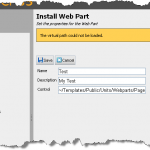
imageSo you have created some web parts and they work fine on your test machine but when you want to register them on a test or production machine you only get a uninformative ‘The virtual path could not be loaded’.

I guess you have already checked that the path is correct several times and that you have deployed all DLL’s and ASP.NET files. What is wrong?

LoadControl() parses and compiles your markup

A quick look with reflection reveals the LoadControl() is called to verify that the web part really exists. When you ask ASP.NET for a user control it will parse the ASCX-file, generate code and then compile it.

So there is a lot that can go wrong and all exceptions from this process is swallowed by the user interface and replaced with virtual path could not be loaded.

A good way to actually see the exception is to create a dummy aspx file and register all user controls and reference them from markup. When you try to view the aspx file any compilation error from the user controls will surface.

Examine compile and pages tag in your web.config

The most common reason markup works fine on one machine but not another is differences in web.config. Check the compilation and pages tag and compare them for differences between the machines.

Tags: , , , ,

One of the big changes between EPiServer CMS 4 and 5 is the handling of PageData instances and Dynamic Properties (read Inherited Property) in the cache. I was reminded of this when I created a custom property and needed access to a Dynamic Property but I always got a null value.

In EPiServer CMS 5 you will always get a read-only PagaData instance and if you want to modify it you have to call CurrentPage.CreateWritableClone() to get an instance that you can modify.

Read Dynamic Propety value returns null

On the read-only version you can always write CurrentPage["MyDynamicProperty"] or CurrentPage.Property["MyDynamicProperty"] to easily get hold of the inherited value. But if you try to do that on a writable PageData instance it will not work and you will always get null back.

In my case when I want the value of a dynamic property in a custom property controller it always returned null because in when you are editing the page your PageData instace is writable.

Using DynamicPropertyTree to FindDynamicProperty

You can retreive the value of a Dynamic Property with the same method that a read-only PageData use if you need it while modifying a page. 

PageReference locationRef = DynamicPropertyTree.Instance.FindDynamicProperty(“MyDynamicProperty”, CurrentPage.Property).Value as PageReference;

Change a Dynamic Property from code

If you need to change a Dynamic Property from code use the class EPiServer.DataAbstraction.DynamicProperty:

DynamicProperty myDynProp = DynamicProperty.Load(CurrentPage.PageLink, "MyDynamicProperty");
myDynProp.LanguageBranch = "sv"; //Only if you have unique values per languge
myDynProp.PropertyValue.Value = "My Value";
myDynProp.Save();

You will also find method like ListForPage(PageReference pageLink) that returns a list of all Dynamic Properties for a given page. DO NOT USE that method in when you just want to read a value! Use you PageData class instead for faster access.

Tags: , , , , ,

Are you also annoyed that EPiServer CMS 5 Friendly URLs and the handy trace.axd utility does not play well together? Does your site have standard aspx-pages that behaves strangely sometimes because EPiServer Friendly URL Rewriter interfere with generated html on the way out?

StarCommunity does not work EPiServer Friendly URL Rewriter

I had this issue with StarCommunity 2.4 from NetStar (now bought by EPiServer) and you could get the most strange side effects in the admin interface with tabs not working, layout issues and navigational problems. All issues disappear if you disabled EPiServer Url Rewriting.

So how can you keep EPiServer Url Rewriting on but disable it for a folder or file? This is how I solved it by adding a few lines in Global.asax.cs:

private void UrlRewriteModule_HttpRewriteInit(objectsender, UrlRewriteEventArgs e)
{
    UrlRewriteModuleBase module = sender asUrlRewriteModuleBase;
    if (module != null)
    {
        module.HtmlAddingRewriteToExternalFilter += module_HtmlAddingRewriteToExternalFilter;
    }
}
private void module_HtmlAddingRewriteToExternalFilter(objectsender, UrlRewriteEventArgs e)
{
    string path = e.Url.Path.ToLowerInvariant();
    e.Cancel = path.StartsWith("/netstar") || path.EndsWith("trace.axd");
}
protected void Application_Start(Object sender, EventArgs e)
{
    EPiServer.Web.UrlRewriteModule.HttpRewriteInit += UrlRewriteModule_HttpRewriteInit;
}

As you can see when the application starts it hooks into an event that hooks into another event that has the possibility to prevent Rewrite. Here we check if the requested URL is either starting with “/netstar” disabling rewrite for everything in the StarCommunity admin folder. It also cancels if it is a call to the trace utility.

Tags: , , , ,

If you have problems with the EPiServer Scheduler Service unexcitingly stopping you can also turn on debug logging to get more clues.

Change EPiServer.SchedulerSvc.exe.config FILE

You need to add the following to the service’s config-file to get detailed call stacks for exceptions that occur in you web application:

<system.runtime.remoting>
  <customErrors mode="Off"/>
</system.runtime.remoting>

Update EPiServer.SchedulerSvc Registry

image Prepare a folder for the log file and make sure the account running the service has write access. I’m usually lazy and give everyone full access since this logging usually is not left on forever.

User RegEdit and change the ImagePath value for the EPiServer Scheduler Service to include a parameter with the log-filename.

HKLM\SYSTEM\CurrentControlSet\Services\EPiServer.SchedulerSvc
ImagePath = C:\Program Files\EPiServer.Scheduler\EPiServer.SchedulerSvc.exe D:\Log\EPiServer.SchedulerSvc.log

Be careful when you edit the Registry! I use to export the key to a file before I change anything so I can look at the original configuration.

See also: Auto Restart of EPiServer Scheduler Service

Tags: , , , , , , ,

« Older entries